

Travelling overseas? How exciting! Learn how Vodacom roaming works, how to activate it and choose the right travel bundle so you can stay connected without bill shock.
Whether you are heading overseas for a long-awaited holiday or packing your bags for an important business trip, your phone will probably be one of the things you rely on most.
Maps, messaging, emails, bookings and calls can all help you navigate a new country. But using your phone abroad can work differently from using it at home, and roaming charges can add up and result in bill shock if you are not prepared.
The good news is that a little planning before you leave can help you stay connected and keep your roaming costs under control.
What is international roaming?
International roaming allows you to use your Vodacom SIM to connect to participating mobile networks when you are outside South Africa. This means you can continue making and receiving calls, sending SMSs and using mobile data while travelling.
Be sure to take your Vodacom with you when you’re traveling. With our international roaming networks in over 200 countries, you’ll be sure stay connected and in touch wherever you go.
Whether you’re living your best life overseas or standing on business, be sure to use your RED rewards while you’re on the go or even before you leave so you can travel in style. Depending on your rewards tier you can enjoy:
- Up to 20% off on FlySafair.
- Up to 4 access passes to the Bivest Lounge at the airport .
- RED VIP exclusive bonus – R99 off your international roaming bill.
1. Activate Vodacom International Roaming on Your Number
Before you jet off overseas, activate roaming on your number via the VodaPay app or USSD *135*130#. It’s best to activate roaming seven days before you leave South Africa.
How to activate international roaming on the VodaPay app:
- Log in to your VodaPay app
- Tap on Buy icon
- Select View more
- Tap on the International Roaming icon
How to activate international roaming via USSD:
- Dial *135#
- Select Buy, then Roaming
- Select International Roaming, then Activate Roaming
- Confirm your roaming activation by selecting Continue
- You will see an on-screen message confirming your roaming activation and then receive an SMS confirming your roaming status, with a link to view roaming rates and FAQs

2. Choose a roaming bundle that suits your needs
Once you’ve activated roaming on your number, you’ll need to buy a roaming bundle to keep you connected during your adventures. The roaming bundle will be activated as soon as you land or arrive at your destination, outside South Africa.
If you mainly need mobile data for maps, messaging and browsing, get Travel Data. Vodacom offers bundles that are valid for seven days, in more than 200 destinations.
- 1GB for R99
- 5GB for R349
If you want to make calls as well as use data, All For You Bundles, combine data and voice minutes, valid for seven days. Current options include:
- 1GB + 100 minutes at R199
- 5GB + 200 minutes at R549
The right option depends on how you expect to use your phone. A holidaymaker who mostly uses WhatsApp and Google Maps may have different needs from a business traveller who expects to make regular calls and attend to work while abroad.
3. Buy an International Roaming bundle to stay connected when you’re abroad
To purchase a roaming bundle on the VodaPay app, log in and tap ‘My account’ > ‘International Roaming,’ and then select ‘Buy a roaming bundle.’ Select the bundle you want and follow the prompts to complete your purchase.
Check out this 30-second clip to learn how you can buy international roaming bundles.
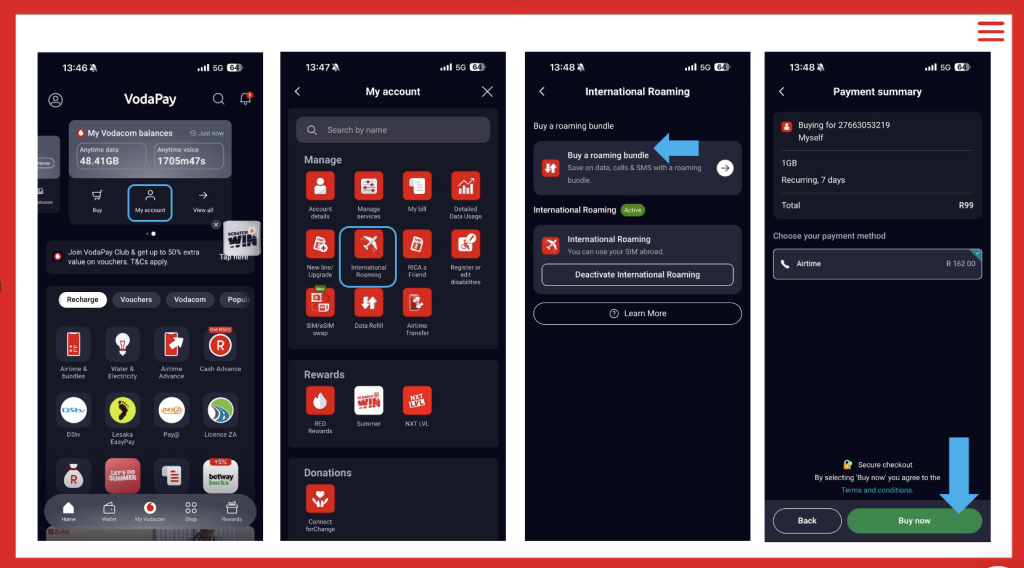
Once you’ve purchased roaming bundles, you’re all set. Your roaming bundle will be activated as soon as you land at your destination.
How can you avoid an unexpected roaming bill?
To purchase a roaming bundle via USSD, dial *135# > ‘Buy’ > ‘Roaming.’ Select the bundle you want to buy and complete the prompts to complete your purchase.
Before your flight, check the applicable rates for your specific destination.
Also remember that in-flight and cruise-ship satellite networks are not covered by the Travel Data or All For You bundles. Standard roaming rates apply, so it is safest to switch off mobile data while you are on a plane or cruise ship unless you know exactly what network you are connected to.
Keep an eye on your usage while travelling. Vodacom sends usage notifications and alerts for Travel Data Bundles, and you can monitor bundle usage through the VodaPay App. Plus, your roaming bundles will auto-renew when they run out, be sure to monitor your usage and where possible, connect to WiFi.
Finally, when you do get back, remember to deactivate international roaming on your number. Dial *135# and follow the above-mentioned steps to activate roaming, however, this time select ‘Deactivate Roaming’.
A few minutes of preparation before you fly can make a big difference. Check your roaming status, choose a suitable option for your trip and confirm your destination’s rates before you go. That way, you can focus on the holiday, meeting or adventure ahead rather than worrying about your phone bill.
Browse our latest stories to experience tech made easy.


